How the 4leggedIT System Works
A clear walkthrough of how we build, launch, and maintain rescue websites with modern tools—without vendor lock-in.
We mention specific tools (like Lovable) as examples of workflows we use. The same concepts apply to other suitable tools that support previewing changes, exporting code, and syncing to Git.
Examples are non-exhaustive and reflect our best guidance as of February 2026. Tool capabilities evolve quickly; reassess over time.
Quick Path
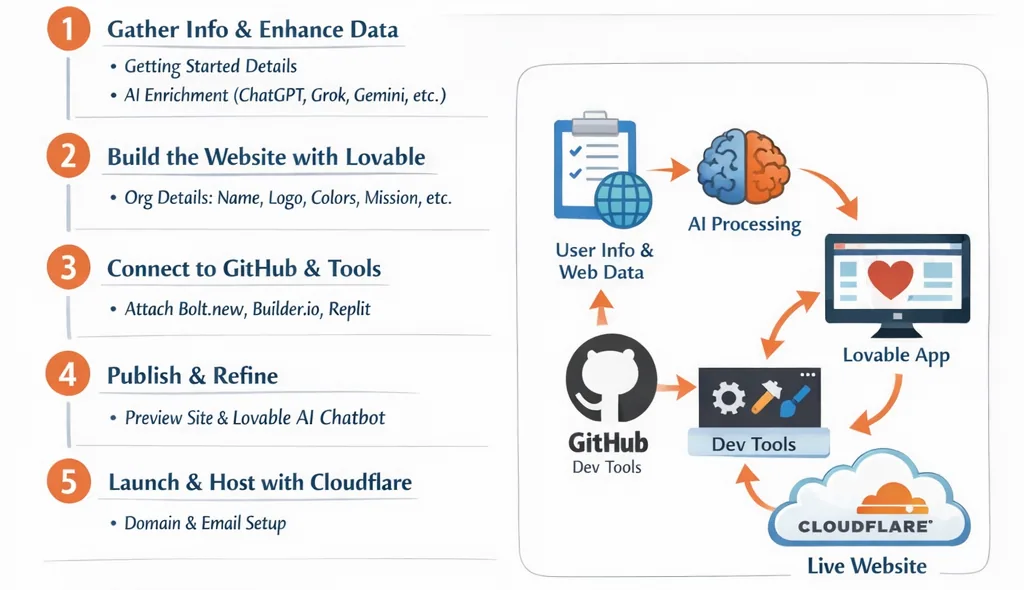
- Skim the workflow diagram to understand the end-to-end flow.
- Open the one accordion step you need right now (the rest can stay collapsed).
- If you’re evaluating control and access, jump to “Who owns what.”
- Keep public pages focused on clear, helpful information (and avoid posting private contact details).
The Complete Workflow
From initial information gathering to a live, maintainable website
A quick note on details
- Use general locations on public pages (city/region is usually enough).
- Keep private phone numbers and addresses off public pages.
- Share process and outcomes more than logistics.
1Information Gathering & Context BuildingWe start by learning about your organization.
What you provide
Through our onboarding forms, you share:
- Getting Started – basic details about your organization
- Tell Us About You – mission, values, history, and goals
- Share Your Workflow – how adoptions, fostering, donations, and communications work today
What we add
With your permission, we also:
- Review publicly available information (your current website, social media, listings, and public profiles)
- Normalize and clarify language, structure, and gaps
AI-augmented enrichment
All of this information is fed into an AI chatbot (such as GPT-5.2, Grok, Gemini, or similar tools) to fill in missing structure (not facts), improve clarity and tone, and create an organized version of your content that stays true to your voice. We do not invent policies or facts.
2Website Creation with LovableOnce the content foundation is ready, we use an AI website builder (often Lovable) to create the initial website project.
- Organization name
- Logo and preferred colors
- Mission and values
- About section
- Adoption and/or foster process
- Donation information
- Contact and intake forms
- Any other relevant sections (volunteering, FAQs, events, etc.)
This gives us a real, editable site quickly—without months of manual setup.
3Version Control with GitHubAfter the initial site is created, we connect the project to GitHub.
Why this matters
- Every change is tracked and reversible
- Your site is never locked inside a single platform
- The codebase belongs to the organization
Tool flexibility
By using GitHub as the central repository, we can optionally connect:
All of these tools work against the same source of truth, allowing flexibility without chaos.
4Preview, Publishing & AI-Assisted EditsUsing the website builder (often Lovable), we publish a preview version of the site and share it with the organization for feedback.
- Explore the site
- Suggest changes
- Use the tool’s AI agent to request updates, improvements, or new features in plain language
This lowers the technical barrier and empowers non-technical teams to participate directly.
5Domain, Email & Hosting with CloudflareIn parallel, we work with Cloudflare to handle infrastructure.
- Domain registration, renewal, or transfer
- Email routing (e.g., info@, adopt@, foster@)
- Secure DNS and traffic protection
- Cloud compute hosting for the website
Why Cloudflare
- Reliable and widely trusted
- Strong free and low-cost tiers
- Transparent pricing
- No proprietary lock-in
Your website is hosted under your own domain, not a platform subdomain.
6Ongoing Development & Long-Term SupportAfter launch, the project continues at your pace.
Our approach
- We evolve the website as the organization evolves
- We suggest improvements that can increase visibility, donations, and adoption outcomes
- We avoid overwhelming teams with unnecessary features
Guiding principles
- Small organizations have limited time and resources
- Sustainability matters more than speed
- The best tools are the ones your team can actually use
We focus on small, incremental improvements that compound over time.
7. Roles & Responsibilities
We handle the tech setup, website building, and maintenance — in the systems and vendor accounts your organization controls, with your permission. You provide the content and feedback to guide us. This ensures everyone knows what they are responsible for.
8. Data Ownership & Access
You retain full ownership of:
When we help manage hosting, DNS, or tooling, we do it by being added as an admin/operator — you remain the account owner.
Never locked into our tools.
9. Security & Privacy
- Protected by Cloudflare
- Data stays private and secure
- No selling or sharing of information
10. What Success Looks Like
- Easy updates and fast changes
- Clear adoption process and better donor support
- A website you control and can evolve over time
11. Common First "Baby Steps"
These steps align with our philosophy of small, sustainable improvements.
Important Notes on Tool Choice & Vendor Lock-In
Protecting your organization's future flexibility
There are many ways to start a website project, and different tools optimize for different workflows.
Portability note:
- Some AI site builders don’t yet support external Git/version control, full export, or easy migration.
- These capabilities evolve quickly; reassess over time.
Our stance — we intentionally favor tools that:
- Work with GitHub
- Allow future migration
- Reduce long-term cost and risk
Avoiding vendor lock-in protects organizations from being forced into expensive plans later.
In Summary
This system is designed to:
Respect the realities of rescue organizations
Use AI as an assistant, not a replacement
Keep ownership and control with the organization
Support growth over months and years—not just launch day
"Technology should feel like help, not another thing to manage."
Ready to Get Started?
Learn more about our process or reach out to discuss your organization's needs.